Ultimate Clean the Game Room Guide: Master the Scavenger Hunt
Looking to organize shelves at lightning speed? Our comprehensive Clean the Game Room guide has all the tips, controls, and strategies you need to win.
A messy room is a gamer's worst nightmare, but in the world of Roblox, it translates into the ultimate test of speed, memory, and organization. If you want to top the leaderboards and impress your friends, you need a reliable Clean the Game Room guide to streamline your sorting process. This fast-paced scavenger hunt requires sharp reflexes and excellent spatial awareness.
This comprehensive Clean the Game Room guide will teach you exactly how to grab scattered game cases, match them to the correct genre shelves, and beat the clock without breaking a sweat. Whether you are playing on a PC or a console, mastering the mechanics is crucial for success. Read on to discover the best strategies, optimal control setups, and advanced speedrunning tips to keep your virtual gaming space spotless.
What is Clean the Game Room?
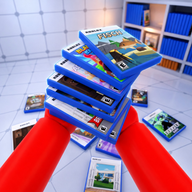
Clean the Game Room is a popular Adventure and Scavenger Hunt experience on Roblox that has garnered over 1.7 million visits. The premise is simple but highly addictive: a massive collection of video game cases has been scattered all over the room, and it is your job to put them back where they belong before the chaos gets out of hand.
Players must scour the environment, pick up the scattered game cases, and identify their specific gaming genres. Once you know the genre, you must navigate to the corresponding shelf and place the game neatly back in its spot. The faster you organize the room, the better your performance.
Community reports suggest that the game gets progressively more challenging as the volume of scattered cases increases. It is not just about finding items; it is about inventory management and efficient pathing. By following this Clean the Game Room guide, you will learn how to minimize your movement and maximize your sorting speed.
Essential Controls You Need to Know
Before you can become a master organizer, you need to familiarize yourself with the control scheme. The game is fully optimized for both PC and console players, offering intuitive inputs for grabbing, dropping, and cycling through your inventory.
Memorizing these controls is the first step in any effective Clean the Game Room guide. Hesitating for even a second to remember which button drops an item can ruin a perfect speedrun. Below is a breakdown of the controls for both major platforms.
Player experience dictates that mastering the "Cycle Held Cases" function is what separates beginners from pros. Instead of running back and forth for a single game case, you can hold multiple items and cycle through them as you approach different genre shelves.
Core Gameplay Mechanics and Shelf Sorting
The core loop of the game revolves around three distinct actions: scavenging, identifying, and placing. When you pick up a game case, you must quickly read its title or look at its cover art to determine its genre. The room is lined with various shelves, each dedicated to a specific type of game, such as RPGs, Shooters, Platformers, or Racing games.
To succeed, you need to build a mental map of the room. Knowing exactly where the "Action-Adventure" shelf is located without having to search for it saves valuable seconds. Many top players spend their first few matches simply walking around the room to memorize the shelf layout before they even attempt a high-speed run.
Here is a look at how you should categorize your mental map when organizing the room.
Step-by-Step Clean the Game Room Guide
If you are struggling to keep up with the mess, you need a structured approach. This section of our Clean the Game Room guide breaks down the optimal step-by-step strategy for clearing the room efficiently.
Step 1: The Initial Sweep Do not immediately run to a shelf after picking up your first game. Instead, perform an initial sweep of a specific quadrant of the room. Pick up as many cases as your inventory allows. Grouping your pickups geographically prevents you from wasting time backtracking across the room.
Step 2: The Assessment Once your hands are full, use your Mouse Wheel (PC) or LT (Console) to cycle through your held cases. Take a quick mental note of the genres you are currently holding. If you have two Racing games and one RPG, you now know your exact drop-off route.
Step 3: The Drop-Off Route Head to the shelf that corresponds to the majority of your held items first. Drop off the two Racing games, then immediately pivot to the RPG shelf. Efficient routing is the secret to high scores in this scavenger hunt.
Step 4: The Reset As soon as your hands are empty, do not run aimlessly. Look for the nearest cluster of dropped games on your way back to the center of the room. Always be moving toward your next objective.
Advanced Tips for Speed and Efficiency
Once you have the basics down, it is time to optimize. Advanced players use several techniques to shave seconds off their completion times. One of the most effective strategies is "corner cutting." When navigating between shelves, always take the tightest possible angles around furniture and obstacles.
Another vital tip in this Clean the Game Room guide is to manage your drops intentionally. If you accidentally pick up a game that belongs on the opposite side of the room, do not carry it with you. Use the Q key or B button to drop it in a central location. You can pick it up later when you are actually heading in that direction.
If you enjoy optimizing your pathing and improving your reaction times, you might also enjoy exploring other scavenger hunt experiences on the official Roblox platform, as many of these skills translate perfectly to other adventure games.
Common Mistakes to Avoid
Even the best organizers make mistakes. However, knowing what to look out for can save your run. The most frequent error new players make is tunnel vision. They see one game case, pick it up, run to the shelf, and ignore the three other cases sitting right next to it. Always maximize your carry capacity before heading to the shelves.
Another common pitfall is accidental dropping. In the heat of the moment, it is easy to accidentally press Q or B instead of cycling through your inventory. This forces you to stop, turn around, and pick the item back up, ruining your momentum.
Here is a quick reference table of common mistakes and how to fix them.
By avoiding these pitfalls and adhering to the strategies outlined in this Clean the Game Room guide, you will easily outpace the competition and keep the virtual game room in pristine condition.
Frequently Asked Questions
What is the main objective in this Clean the Game Room guide? The primary objective is to pick up scattered video game cases from the floor, identify their specific gaming genre, and place them on the matching genre shelves as quickly as possible.
Can I play Clean the Game Room on a console? Yes, the game is fully compatible with consoles. You can use RT to pick up and place items, B to drop them, and LT to cycle through the cases you are currently holding.
How do I drop a game case if I picked up the wrong one? If you pick up a case you do not want to carry, simply press the Q key on a PC keyboard or the B button on a console controller to drop it back onto the floor.
Is there a specific strategy for getting faster times? Yes, as detailed in our Clean the Game Room guide, the best strategy is to memorize the shelf locations, pick up items in clusters, and cycle your inventory while moving so you are always ready to place the correct game the moment you arrive at a shelf.
Related guides
Clean the Game Room Beginner Guide: Master the Ultimate Sorting Challenge
Discover the ultimate Clean the Game Room beginner guide. Learn the best strategies, controls, and tips to organize shelves fast in this Roblox adventure.
Ultimate Clean the Game Room Roblox Guide: Tips & Controls
Master the mess with our comprehensive Clean the Game Room Roblox guide. Learn controls, genre matching strategies, and speedrunning tips to organize fast.